HTML5与CSS3权威指南-读书笔记
一、HTML
1. HTML5概述
发展三阶段
Web 1.0 内容为主:
热门技术: HTML 、 CSS
Web 2.0 的Ajax应用:
热门技术: JavaScript 、 DOM 、 异步数据请求
HTML5+CSS3时代:
亮点技术: 富图形 、 富媒体内容
H5产生背景
- 需要统一的互联网通用标准(以便开发不用针对不同浏览器设置兼容)
- 浏览器厂商的支持
H5设计原则: 兼容性 、 实用性 、 非革命性的发展
H5目标
- 更简单的Web程序(使用 属性 代替原本脚本内容)
- 更简洁的HTML代码(通过使用 语义化标签 )
H5解决问题
- 统一浏览器标准
- 提供语义化标签,使页面结构清晰
- 添加新API,为Web应用程序提供更丰富的功能
2. HTML5与HTML4的区别
基本语法区别
- DOCTYPE声明 、 SYSTME识别符
1
指定 字符编码
1
<meta charset="UTF-8">
新增元素
结构元素:
section 、 article 、 aside 、 header 、 footer 、 nav 、 figure 、 main
其他元素:
video 、 audio 、 embed 、 mark 、 progress 、 meter 、 time 、( ruby 、 rt 、 rp )、 wbr 、 canvas 、 details 、 datalist 、 datagrid 、 output 、 source 、 dialog
input元素:
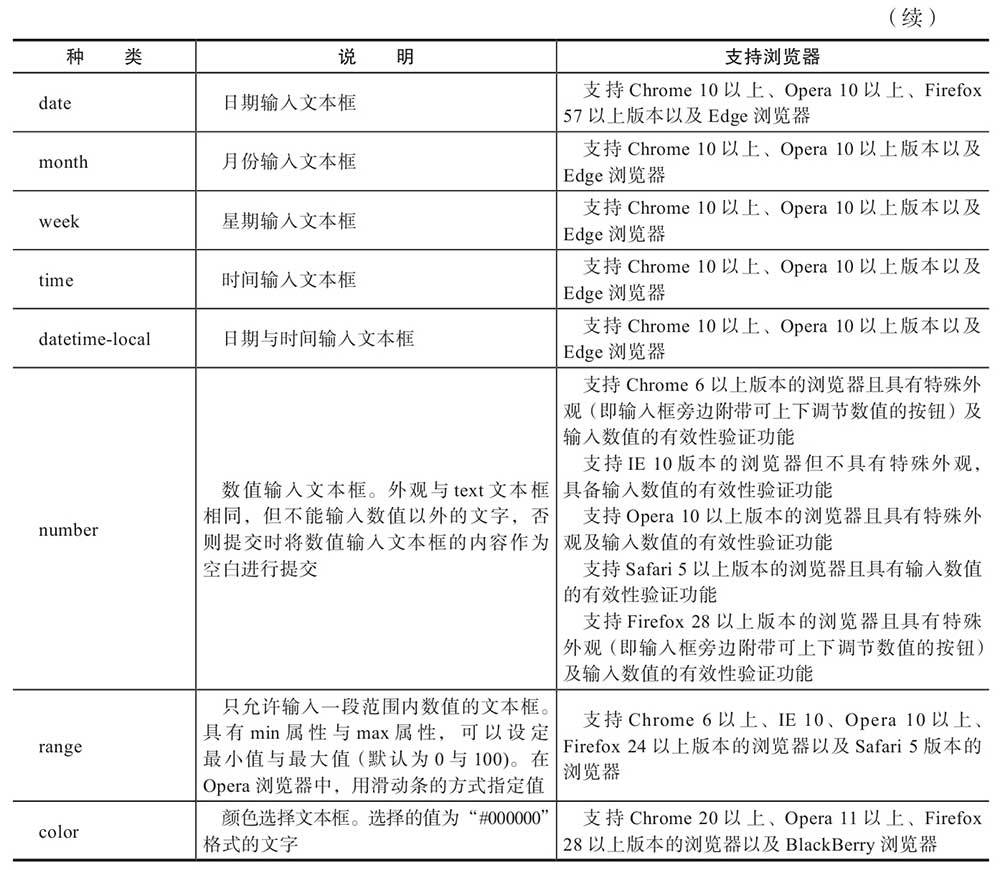
email 、 url 、 number 、 range 、 date 、 month 、 week 、 time
新增属性
- 表单相关
- 链接相关
- 其他
- 全局属性: contentEditable 、 designMode 、 hidden 、 spellcheck 、 tabindex
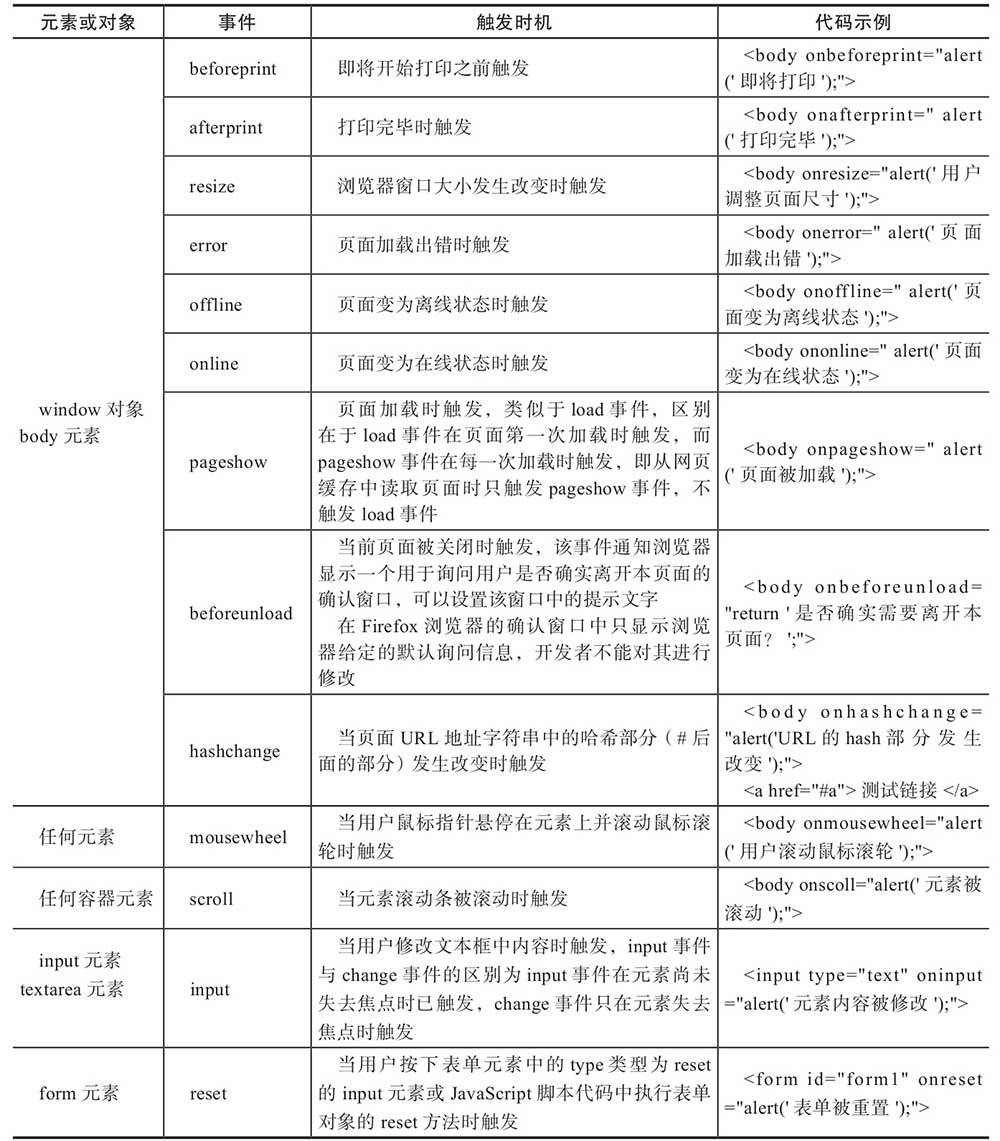
新增事件
3. 新增结构元素
主体结构元素: article 、 section 、 nav 、 aside
article与section的区别:
- article:更强调主体性、内容完整
- section:更强调分段的作用
非主体结构元素: header 、 footer 、 address 、 main
其他元素: time(pubdate属性)
网页大纲编排规则(H5分析器页面结构的分析原则): 显式编排 、 隐式编排
4. 表单元素及其他元素的新增和改良
4.1 表单内元素属性
- form
- formaction
- formmethod
- formenctype
- formtarget
- autofocus
- required
- labels
- <label>中: control
- 文本框中: placeholder 、 list 、 autocomplete 、 pattern 、 selectionDirection
- <checkbox>复选框中: indeterminate
- <image>中: height 、 width
- <textarea>中: maxlength 、 wrap
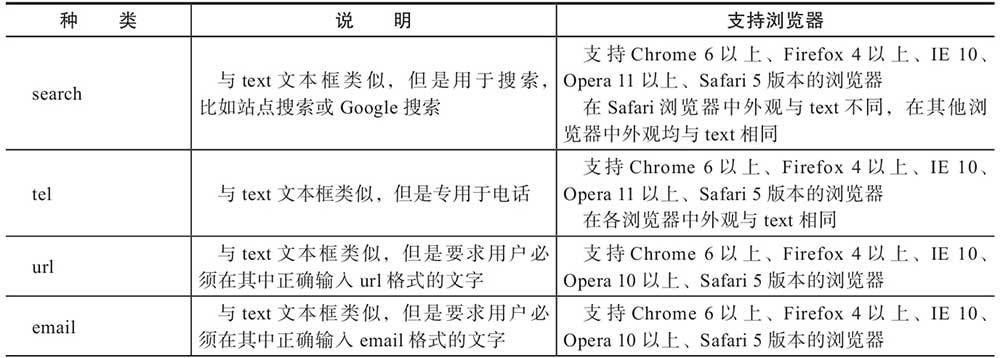
4.2 <input>元素种类增加和改良
4.3 新增<output>元素
4.4 表单验证
- 自动验证:通过元素属性 pattern
- 取消验证:
- <form>的 novalidate 属性
- input/submit元素的 formnovalidate 属性
- 显式验证(form、input元素):
- checkValidity 方法,返回boolean
- validity 属性,返回validityState对象
4.5 新增表单外页面元素
- figure 、 figcaption :表示网页独立的内容,从网页上移除后不会对页面上其他内容产生影响
- 适用场景:图片、统计图、代码示例、音频视频插件、统计表格等
- details 、 summary :标识该元素内部子元素,可以展开、收缩显示
- open属性、toggle事件
- mark :网页检索结果关键词高亮
与strong、em的区别:
- mark:标示目的与原文作者无关,目的是吸引当前用户的注意力,供用户参考
- strong:原文作者用来强调文字重要性
- em:原文作者用来突出文章重点
- progress :代表任务的完成进度
- 属性:value、max
- meter :表示规定范围内的数量值
- 属性:value、min、max、low、high、optimum
- dialog :对话框
- 属性:open、returnValue
- 方法:show、close、showModal
4.6 改良表单外页面元素
<a> :download属性
<ol> :start、reversed属性
dl、dt、dd :专门用来定义术语的列表
cite :表示作品的标题,但是不能用来表示作者
small :通用展示性变为专门用来标识所谓“小字印刷体”,但字体不会变小,需要CSS
iframe :sanbox属性(allow-forms,allow-scripts,allow-same-origin,allow-top-navigation)
<script> :
async:加载完单个脚本执行onload
defer:加载完所有脚本再执行onload
二、ES6
- 可以查看阮一峰的ES6入门教程
- ECMAScript 为JavaScript 语言的标准 ,其中还封装了其他语言,包括ActionScript、JScript
1. 新增语法
- for-of :
- 对 集合 循环,如:Array、Map、Set、String
- 对象不行,因为对象非集合
- let 关键字:声明的变量以代码块为作用域,而非以当前函数为作用域
- class类 :
- 类的静态方法: static
- 类的继承: extends
- 调用父类方法: supper
- 参数:
- 不确定参数 :只能用于函数中最后一个参数(被放入数组中传入,没传则为空数组)
- 默认参数值 :
- 在函数被调用时才确定,所以可使用条件判断表达式
- 传undefined等于没传参,所以可用于占位,不覆盖默认值
- 没被指定默认参数值则视为undefined
- 箭头函数 :
- 使用箭头函数创建对象,需要在两边加括号,如:var text = ()=>({name:’abc’});(因为箭头后加大括号被视为一段代码的开始)
- 与普通函数的区别:箭头函数没有自己的this对象, 箭头函数的this对象总是从函数外部直接继承
- 生成器函数Generator :
- 返回值对象IteratorResult
- 生成器实现的是协程模式而非线程
- 作用:定义迭代器,如:for-of循环
- 解构赋值: spread运算符(…)
- 模板字符串 :标签化的模板字符串(函数调用的一种形式),如:fn’h${1}e${2}I${3}’等同于fn([‘h’,’e’,’I’],1,2,3)
- JS模块化 :
- 未模块化时的缺点:
- 离不开与HTML文件的紧密结合
- 不能单独管理js脚本文件
- 必须注意脚本文件读取顺序
- 规则:
- 只能在顶部作用域中使用import、export,不能用在条件判断和函数中
- 模块对象是被冻结的,不允许在模块外部对模块添加新特性
- 不能对模块导入进行错误处理,不能在try/catch机制中进行导入
2. 新增对象及数据类型
异步处理: Promise对象 、 async/await组合
- async函数可以返回Promise,因为它们可以混合使用
Symbol 数据类型:
- 被设计用来 避免命名冲突 ,只在其被创建的作用域中有效。因此,大多数对象检查特性会忽略Symbol属性名
- 可以作为属性名,但是使用for…in、Object.keys、getOwnpropertyNames遍历时列举不出来。可以通过 Object.getOwnPropertySymbols(obj) 方法列举对象中的Symbol属性名
- 唯一性:一经创建,不可修改,不能自动转换成字符串
- Symbol.for(string) :是否有该参数为名称的Symbol,如果有,返回这个,没有则创建
- Symbol.keyFor() :返回一个已登记的Symbol名称,用于检测是否被创建
- Symbol.iterator :为对象定义一个用于创建对象迭代器的方法
- 代理Proxy 与 反射Reflect 对象:
- 对象中有14中内置方法,如:get、set等,使用代理可以 重载 这些内置方法
- 使用反射来获取重载之后的方法
新增集合对象
旧对象的缺陷:
- 需要避免对象方法被解析为对象的数据
- 键名只能为字符串或Symbol
- 无法直接知道有多少属性(新增的有 size )
为了避免对象方法和数据冲突,新增集合数据不保存为属性,所以不能直接以obj.key等访问,只能通过方法来访问
新增集合对象:
Set :不保存重复,类似数组
- 方法: add 、 clear 、 has 、 delete 、 entries 、 keys 、 values 、 forEach 等
Map :键名/键值对组成的集合,键名也可以是非字符串
- NaN也可以作为键(虽然NaN和任何值甚至时自己都不相等)
- 方法: get 、 set 、 clear 、 has 、 delete 、 entries 、 keys 、 values 、 forEach 等
只能强引用,内存回收机制不会自动回收,可能导致内存泄漏,可以使用 WeakSet 、 WeakMap 弱引用,但是 不能进行遍历
WeakSet :只能用 has 、 add 、 delete 方法,并且 存的数据必须为对象
WeakMap :只能用 has 、 get 、 set 、 delete 方法,并且 键名必须为对象
3. 已有对象的扩展
- Number :
- Number.isInterger
- Number.isNaN
- String :
- 方法:padStart、padEnd
- Array :
- Array.from
- Array.of
- 方法:fill、find、findIndex、copyWithin、entries、keys
- Object :
- Object.assign
- Object.getOwnPropertyDescriptors
- 方法:values、entries
三、文件API
- file对象 :
- 属性:name、lastModifiedDate
- ArrayBuffer 、 ArrayBufferView 、 DataView 对象:
- ArrayBuffer :代表一个存储固定长度的二进制数据缓存区
- ArrayBufferView :将缓存区中的数据转化成各种数值类型的数组(使用继承ArrayBufferView类的子类实例来存取,如 Int8Array 等)
- DataView :也可以使用继承了ArrayBufferView类的DataView来存取,如 dataview.getInt8(…)方法 等
- Blob对象 :
- 代表原始二进制数据( file也继承了Blob )
- 属性:size、type
- 方法:slice( 常用于切片 )
- FileReader 对象:
- 把文件读入内存,并读取文件中的数据
- 方法: readAsBinaryString 、 readAsText 、 readAsDataURL 、 readAsArrayBuffer 、 abort
- 事件: onabort 、 onerror 、 onloadstart 、 onprogress 、 onload 、 onloaded
四、本地存储
1. Web Storage存储机制
- sessionStorage
- localStorage
2. indexedDB 本地数据库
存储在客户端本地的 NoSQL 数据库
2.1 连接数据库
- indexDB.open(dbName, dbVersion) :返回一个IDBopenDBResult对象(请求数据库连接的请求对象)
- 属性: target.result (IDBDatabase对象,连接成功的数据库对象)
- 事件: onsuccess 、 onerror
- 关闭连接: (IDBDatabase对象)idb.close()
- 所有仓库名: idb.objectStoreNames
2.2 数据库版本更新
- 3种事务: 只读 、 读写 、 版本更新 事务
- 不允许数据仓库在同一版本发生变化,因此, 对象仓库(Object Store)和索引(index)变化只能在版本更新事务中
- 事件: onupgradeneeded
- 属性: target.transaction (IDBTransaction对象,代表事务)、 oldVersion 、 newVersion
2.3 创建/删除对象仓库
- idb.createObjectStore(name, optionalParameters) :返回一个IDBObjectStore对象(代表对象仓库)
- idb.deleteObjectStore(objectStoreName) :删除对象仓库
2.4 创建索引
- (IDBObjectStore对象)store.createIndex(name, keyPath, optionalParameters)
2.5 开启事务(只读、读写)
- idb.transatcion(storeName, mode) :返回一个IDBTransaction对象(代表开启的事务)
- 必须写在函数中,函数结束自动提交事务
- 中止事务: (IDBTransaction对象)tx.abort()
- 事件: oncomplete 、 onabort
2.6 获取对象仓库
- tx.ObjectStore(storeName) :返回一个IDBObjectStore对象(代表获取的对象仓库)
2.7 插入数据
- (IDBObjectStore对象)store.put/add(value) :返回一个IDBRequest对象(代表向数据库发出的请求), 发出后立即异步执行
- add 方法:键值在仓库中已存在,则保存失败
- 事件: onsuccess 、 onerror
2.8 查找数据
- 查找数据(如果有多条,只拿到第一条):
- store.get(value)
- idx.get(value) :通过索引查找(idx获取方式: store.index(索引) ,返回IDBIndex对象,代表获取的索引)
- store.getKey(range) :只获取键值
- 通过游标查多条: store/idx.openCursor(range, direction)
- range:IDBKeyRange对象,如:bound(1, 4)
- 获取数据为IDBCursorWithValue对象
- 属性: value (数据对象)
- 方法: update 、 delete 、 continue (继续检索)
- 查找所有: store/idx.getAll(range, count)
- 获取的数据为数组
- 使用索引会根据索引属性值排序
- 其他:
- idx.getKey(key) :根据索引获取单条数据主键
- idx.getAllKeys(range, count) :获取所有数据主键(按索引值排序)
- store/idx.openKeyCursor(range, direction) : key 属性值为索引属性值/主键值
- idx.count(key) :获取值为key的条数
2.9 统计条数
- store.count()
2.10 删除数据
- store.delete(key) :根据主键单条删除
2.11 删除索引
- store.deleteIndex(IndexName)
- 列举所有索引名: store.indexNames
2.12 游标对象方法
- cursor.continue(key) :后续查找的数据必须有key值的,不然报错
- cursor.advance(number) :查找出的数据,下一条与当前间隔number条数据
五、数据请求XHR(XMLHTTPRequest)和Ftech
- XHR新增属性:
- responseType :指定服务器返回数据的类型(如:text、arraybuffer、blob、json、document)
- response :服务器端响应的数据
- 跨域:响应头信息中 Access-Control-Allow-Origin 参数
- Fetch(使用Promise):
- 请求头中 Conten-Type 参数
- 请求数据body中可以为ArrayBuffer、ArrayBufferView、Blob/File、字符串、FormData类型
- 请求返回数据response拥有方法: arrayBuffer 、 blob 、 json 、 text 、 formData
六、Web Workers处理线程
- Web Workers用来在Web应用程序中实现 后台处理 (因为以前都是单线程执行)
- 后台线程不能访问页面或窗口对象(document和window)
- Workers :
创建调用:
1
2
3
4
5
var work = new Worker("脚本.js");
work.onmessage = function(event){
//event.data:接收的消息
}
work.postMessage(message)//发送消息线程脚本:
1
2
3
4
5
6
onmessage = function(event){
//event.data
...
postMessage(result);//送回消息
close();//关闭进程
}嵌套调用中子线程与子线程之间数据交互,必须通过父线程的消息接收发送来实现
- Shared Worker (多页面共用一个后台进程):
创建调用:
1
2
3
4
5
6
var worker = new SharedWorker(url, [name])
var port = worker.port;
//port对象方法:postMessage、start、close
port.onmessage = ()=>{}
//或者
port.addEventListener//但是需要调用start方法脚本:
1
2
3
4
5
onconnect = function(event){
var port = event.port[0];//页面上的Shared Worker对象的端口
port.onmessage = function(){}
port.postMessage(result);
}
七、Service Worker
- 本质上充当Web应用程序与浏览器之间的代理服务器
- 完全异步,所以不能使用同步API,如:同步XHR、localStorage等
- 注册: navigator.servieceWorker.register(“/sw.js”) (路径是 相对于源的地址 )
- 通过 Cache API 中的 CacheStorage 对象(使用caches引用)来缓存服务器资源
- 方法:
- open(“v1”) =>返回的cache对象方法有:
- addAll([…]) :缓存指定所需URL列表
- put(request, response) :将请求及响应资源存入缓存
- match(event.response) :查询请求资源是否在缓存中
- keys() :当前保存的所有缓存名称
- delete(cacheName) :删除指定缓存
- 方法:
- Service Worker 事件 :
- install (安装)、 fetch (资源请求)、 activate (激活)
- 事件对象event方法:
- waitUntil(promise) :确保在promise对象中指定异步操作完成前不会终止所处工作线程
- respondwith(response) :自定义代替响应
- 使用场景:
- 后台数据同步
- 响应其他源中请求
- 集中进行计算成本比较高的数据更新,如地理位置和陀螺仪信息
- 客户端编译及例如less、JavaScript模块等出于开发目的的依赖管理
- 提供后台服务的钩子
- 性能增强,例如预先抓取用户有可能会利用到的资源
八、通信API
1. 跨文档信息传输消息
- 文档与文档之间 :
- 接收:
- 监听message事件: window.addEventListen(“message”, function(){…}, false)
- 属性:orgin、data、source
- 发送:
- window的postMessage方法: otherWindow.postMessage(message, targetOrigin)
- 通道通信(多源之间通信) :
- 通过 MessageChannel 和 MessagePort 对象:var mc = new MessageChannel();
- MessageChannel对象创建时,同时创建两个端口: MessagePort对象的port1、port2属性
- 事件: onmessage
- 方法: postMessage 、 start 、 close
2. WebSockets API
- 创建:var websocket = new WebSocket(URL);
- 方法: send 、 close
- 事件: onmessage 、 onopen 、 onclose
- 属性: readyState
- 使用场景:
- 多人游戏网站
- 聊天室
- 实时体育或新闻评论网站
- 定时交互用户信息的社交网站
3. Server-Sent Events API
- 定义:服务器端主动发送到客户端的单项通信机制
- 创建:var source = new EventSource(“test.php”);
- 事件: onmessage 、 onopen 、 onerror 、 onrequests (特定事件)
- 属性: lastEventId 、 readyState
- 使用场景:需要实时显示服务器端数据的场合,如:
- 股票软件中显示股票的在线数据
- 新闻网站中显示最近发生的重大新闻
- 在线聊天软件中实时显示用户名及用户人数
4. Broadcast Channel API
浏览器上下文中同源通信
1
2
3
const channel = new BroadCastChannel(通道名);
channel.postMessage(...);
channel.onmessage = function(e){...};同页面postMessage不会触发message事件
方法:close
使用场景:几个浏览器或标签或workers中进行通信的场景,如:
- 感知其他窗口或标签中的用户操作
- 感知用户在其他窗口或标签中的登录
- 通知worker执行一些后台处理
九、Web组件(Web Component)
1. template模板
- 模板内容动态插入页面,未被调用时,内容不会被渲染
- 模板不可能被预渲染,因此不能预执行任何片段,不能预加载视频、音频等,所有代码在模板调用时执行
- 调用之前,模板中内容不作为DOM树中内容,因此使用getElementById等方法是不能获取到模板中的任何内容(但是可以获取到模板元素本身)
- 通过content属性的cloneNode方法创建模板内容 副本 (包含了模板内容的DocumentFragment)来进行激活
- 嵌套模板时,外层模板被激活时不会激活内层模板,因此同样手动激活内层模板
2. Shadow Dom组件
定义:局部作用的DOM树,并附加在其他元素上,但与父元素分离开来
优点:
- 隔离DOM:组件的DOM是独立的
- 作用域CSS:组件内部定义CSS在其作用域内,页面样式不会渗入到组件内部
- 简化CSS:无需担心与页面样式产生冲突
- 效率:可以将页面看成多个DOM块
创建:通过 attachShadow 方法为宿主元素附加一个影子根(shadowRoot)节点
1
2
let root = document.getElementById("div").attachShadow({mode:'open'})
// {mode:'close'}则为闭合影子根,在js代码中无法访问组件的内部DOMslot 元素:组件内部的占位符
事件: slotchange (组件外部slot属性元素产生变化时触发)
使用样式:
- 默认情况下,CSS样式只在影子根节点中起作用
- 定义宿主元素样式: :host/:host() (宿主元素本身的样式优先级更高)
- 根据匹配条件定义外部元素样式: :host-context(选择器)
- 为分布式节点(组件外部slot属性元素)定义样式: ::slotted(选择器)
- 从组件外部设定组件样式:
- 使用元素名称选择器
- 使用CSS变量创建钩子
3. 自定义元素
定义:开发者自定义的一种HTML元素
创建:
使用window对象的 customElements 属性值对象的 define 方法
使用 类继承 的方法对HTML元素进行扩展
1
window.customElement.define("app-drawer", class extends HTMLElement{});
创建规则:
- 名称必须包含短横线(-)
- 不能用define方法多次定义同一元素,会报错
- 元素不能自我封闭,必须编写封闭标签(如:
)
定义的特别生命周期钩子:
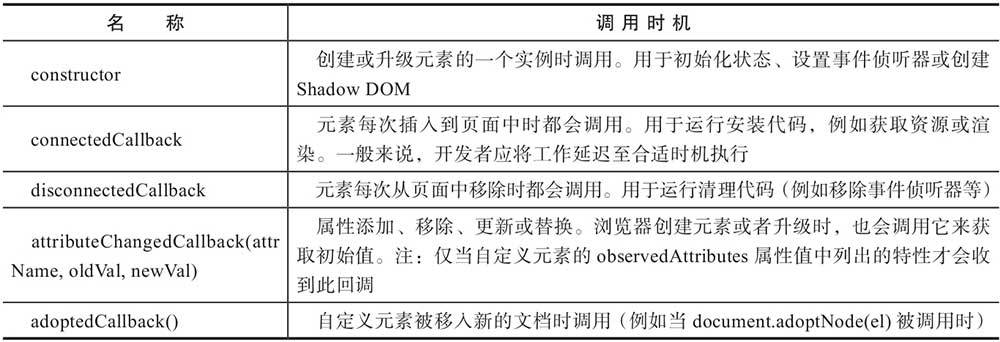
4. HTML导入
传统方式: Iframe 、 AJAX
导入方式:
1
<link rel="import" href="xxx.html">
- 事件: load 、 error
可融入CSS、JS或HTML文档中可以包含的任何内容
要点:
导入的MIME类型是text/html
导入跨域资源需要将该资源设置成可跨域请求
相同URL地址导入仅获取和解析一次,表示导入中的脚本只在第一次执行
导入中的脚本按顺序执行,不会阻塞主页面的解析
脚本在导入时被运行,而样式、元素及其他需要明确被加入主页面中
导入的脚本会在主文档的window上下文运行,因此
window.document 为主页面文档
window.document.currentScript.ownerDocument 为导入文档
使用场景:
- 将相关的HTML、CSS及JS资源作为一个单独的包分发。理论上甚至可以在应用中导入一个完整的Web应用
- 增强代码的模块化与可复用性
- 可以通过导入来定义自定义元素,将定义与使用分离
- 可用于管理依赖,可以自动解决资源的重复加载问题
十、Canvas
1. 图形上下文(graphics context)
- 封装绘图功能的对象
- 获取: document.getElementById(“canvas”).getContext(“2d”);
2. 绘制图形
- 属性:
- fillStyle :填充样式
- strokeStyle :边框样式
- lineWidth :边框宽度
- lineCap :为直线添加线帽
- lineJoin :直线交汇拐角形状
- 方法:
- fillRect(x, y, width, height) :填充矩形
- strokeRect(x, y, width, height) :绘制矩形边框
- clearRect(x, y, width, height) :擦除画布中内容
3. 使用路径
创建: beginPath()
关闭: closePath() (如果不关闭路径,已创建的路径会永远保留,创建的图形会重叠)
设置:
- arc(x, y, radius, startAngle, endAngle, anticlockwise) :圆形
- ellipse(x, y, radiusX, radiusY, tation, startAngle, endAngle, anticlockwise) :椭圆
- moveTo(x, y) :将光标移动到指定坐标
- lineTo(x, y) :绘制直线
- setLineDash([]) :虚线形状
- getLineDash() :获取虚线数组
- artTo(x1, y1, x2, y2, radiusX[, radiusY, rotation]) :绘制曲线
- bezierCurveTo(cp1x, cp1y, cp2x, cp2y, x, y) :贝塞尔曲线
- quadraticCurveTo(cpx, cpy, x, y) :二次样条曲线
Path2D对象使用路径:
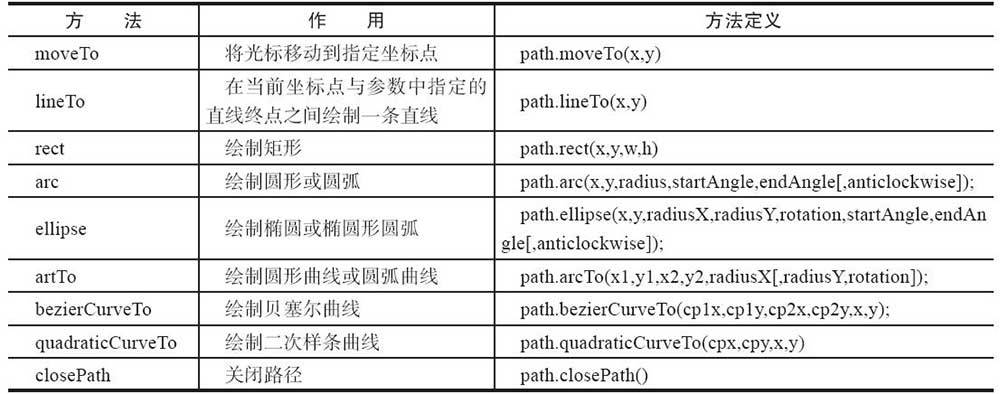
addPath方法 :将一个对象路径添加到另一个中
最终都要通过 fill() 、 stroke() 方法绘制
4. 渐变
- 线性渐变: createLinearGradient(Xstart, Ystart, Xend, Yend)
- 径向渐变: createRadialGradient(Xstart, Ystart, radiusStart, Xend, Yend, radiusEnd)
- 颜色设定: addColorStop(offeset, color)
5. 变形
- 平移: translate(x, y)
- 扩大: scale(x, y)
- 旋转: rotate(angle)
- 矩阵变换(以上3种都能实现): transform(m11, m12, m21, m22, dx, dy)
- 先重置矩阵再变换: setTransform(m11, m12, m21, m22, dx, dy)
6. 阴影
- 阴影横向位移量: shadowOffsetX
- 阴影纵向位移量: shadowOffsetY
- 阴影颜色(不显示阴影则设置透明): shadowColor
- 阴影模糊范围: shadowBlur
7. 图像
- 使用image的onload事件边加载图片边绘制
- 绘制:
- drawImage(image, x, y, w, h)
- createPattern(image, type) :平铺
- clip() :裁剪(需先创建路径,通过save、restore方法在设置好后恢复之前保存的上下文)
- 像素处理:
- getImageData(x, y, w, h) :返回canvasPixeArray对象,属性: width 、 height 、 data 等
- putImageData(imageData, dx, dy[, x, y, w, h]) :图像重新绘制在画布上
- 图形图像的组合、混合: globalCompositeOperation 属性
8. 文字
- 属性:
- 字体: font
- 水平对齐: textAlign
- 垂直对齐: textBaseline
- 方法:
- fillText(text, x, y[, maxwidth])
- strokeText(text, x, y[, maxWidth])
- measureText(text) :获取文字宽度,返回一个TextMetries对象(width属性表示宽度)
9. 其他
保存与恢复图形上下文对象状态: save() 、 restore()
canvas图像转换:
- toDataURL(mimeType)
- toBlob(callback[, mimeType, qualityArgument])
解码图像: createImageBitmap(image, x, y, w, h).then() (用于在后台解码图像,返回一个ImageBitmap对象)
十一、多媒体相关API
元素: video 、 audio 、 source (src、type属性)
属性:
- src
- autoplay :自动播放
- preload :预加载
- poster (video独有):不可用时的替代图片
- loop :循环播放
- controls :控制条
- width 、 height (video独有)
- currentTime :当前播放位置
- defaultPlaybackRate :默认播放速率
- playbackRate :当前播放速率
- volume :音量
- muted :静音状态
只读属性:
- error
- networkState :当前网络状态
- currentSrc :媒体URL地址
- buffered :返回实现TimeRanges接口对象,确认浏览器是否已缓存媒体数据
- readyState :当前播放位置就绪状态
- seeking :是否正在请求某一特定位置数据
- seekable :返回一个TimeRanges对象,表示请求到的数据时间范围
- startTime :媒体播放开始时间
- duration :媒体文件总播放时间
- played :返回TimeRange对象,可以读取媒体文件已播放部分的时间段
- paused :是否处于暂停
- ended :是否播放完毕
方法:
- play :播放
- pause :暂停
- load :重新载入媒体
- canPlayType (mimeType):是否支持指定媒体类型
事件:
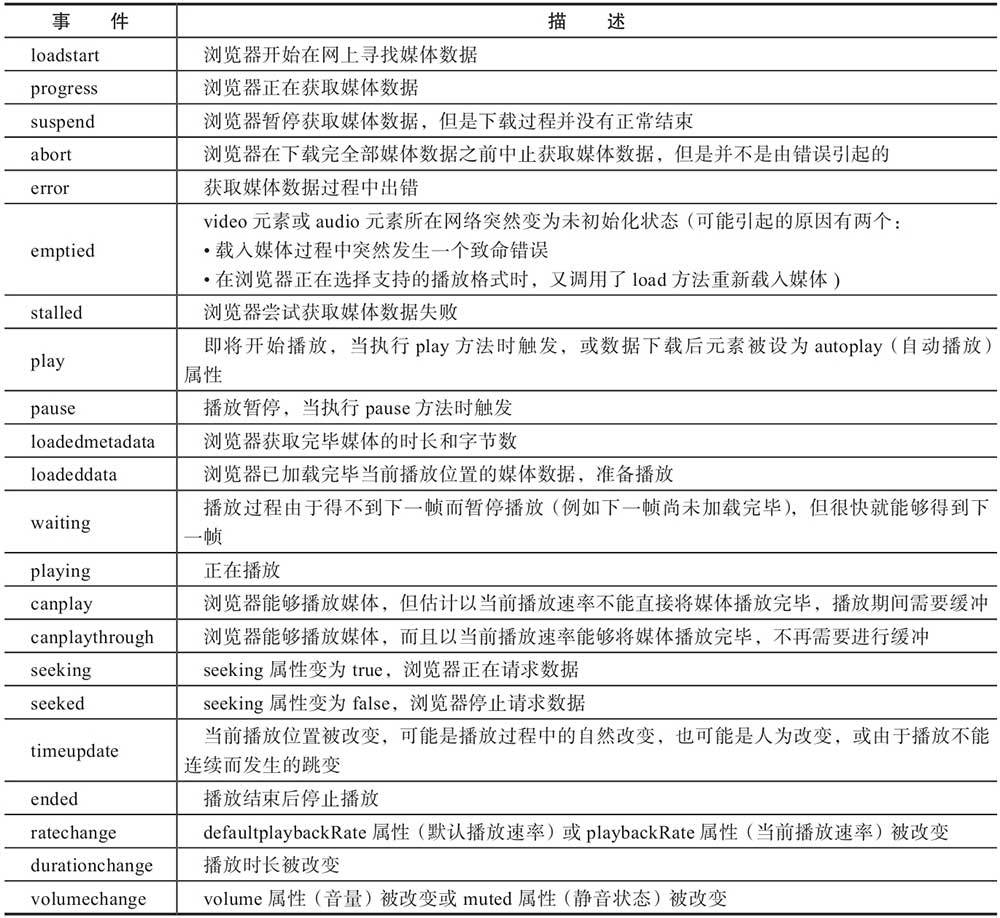
十二、CSS3
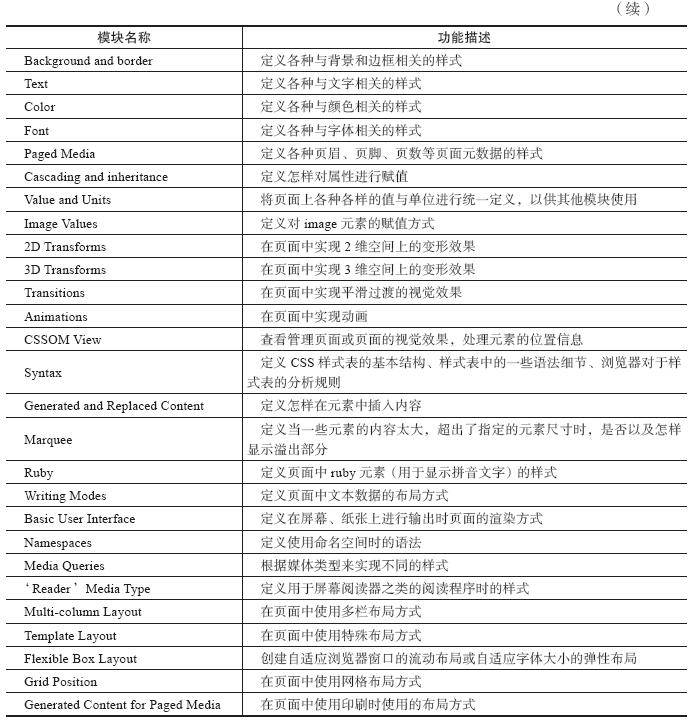
1. CSS模块化结构
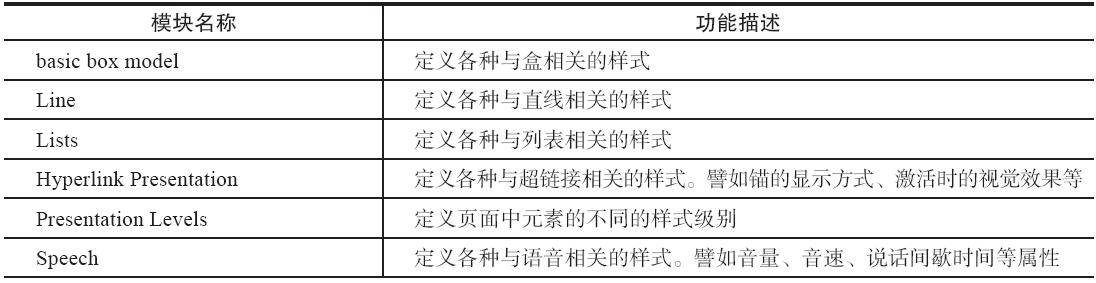
2. 选择器
属性选择器: [attr(*/^/$)=val]
伪类选择器: link 、 visited 、 hover 、 active
伪元素选择器: first-line 、 first-letter 、 before 、 after
结构性伪类选择器:
- root
- not
- empty
- target (用于页面锚点跳转)
- first-child 、 last-child 、 nth-child 、 nth-last-child (用于连续如列表项目元素)
- nth-of-type 、 nth-last-of-type (用于不连续元素)
- only-child
UI元素状态伪类选择器:
- hover 、 active 、 focus (针对鼠标指针)
- enabled 、 disabled (可用、不可用状态)
- read-only (只读)、 read-write (非只读状态)
- checked 、 default 、 indeterminate (用于单选、复选框)
- selection (选中状态)
- invalid 、 valid
- required 、 optional (允许使用required但没用时的状态)
- in-range 、 out-of-range
兄弟元素选择器: <子元素>~<子元素后的兄弟元素>
选择器 在页面中插入内容 :通过beofre、after的content属性
content属性值:
none (仅用于before,after)/ normal / url(‘’)
attr(属性名) :显现出对应属性值
counter(计数器名, 编号种类) :
需要结合属性: count-increment: 计数器名
嵌套编号中重置编号需要结合属性: counter-reset: 子计数器名
- open-quote/close-quote (用于两边添加文字符号,如双引号):需要结合 quotes 属性
3. 文字相关样式
文字阴影: text-shadow : x y r color;
文本自动换行: word-break : normal/keep-all/break-all;
长单词/URL自动换行: word-wrap : normal/break-word;
用户是否可选取文字: user-select : none/text/all/element;
使用服务端字体:
@font-face{
font-family: WebFont;//(元素使用字体时也需定义这个属性)
src: url()fomat();// 或local():使用客户端字体
}
字体种类切换调整字体尺寸: font-size-adjust : none/aspect值(比例值)
字体大小 rem单位 :根据页面根元素(一般html元素)的字体大小(16px)计算
4. 盒模型相关样式
盒类型: display 属性
display属性值:
block / inline / inline-block (可以指定宽高,可用于并列显示多个block元素)
inline-table / list-item (列表标记使用list-style-type)
(后面有block元素) run-in (显示在内部)/ compact (显示在左部)
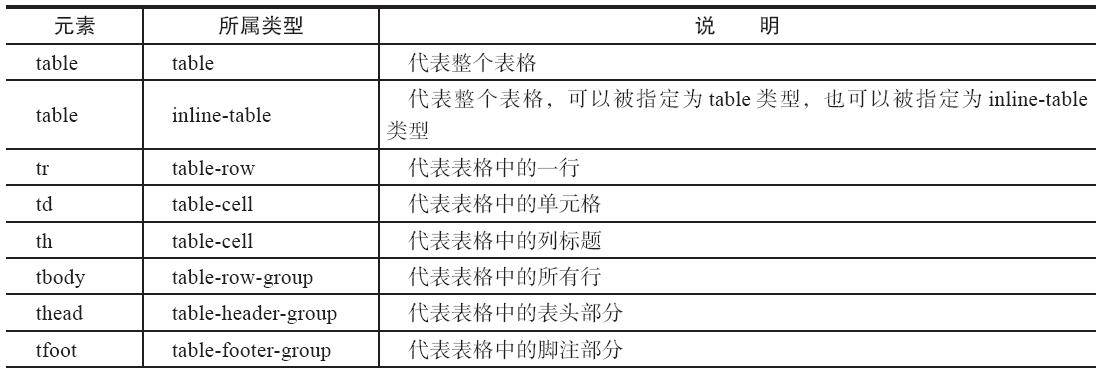
表格相关类型

none
超出内容显示:
- overflow 属性:hidden/scroll/auto/visible
- overflow-x / overflow-y 属性
- text-overflow 属性:ellipsis(水平方向查出范围时展示省略号,因此配合 white-space: nowrap 使用)
盒阴影: box-shadow 属性
- box-shadow: x y r color;
- box-shadow: inset x y r1 r2 color; (内部阴影)
盒宽高计算: box-sizing 属性
- box-sizing属性值:
- content-box
padding-box(content+padding宽高)(曾经在 CSS 规范的早期草案中存在过,但最终被移除了,没有被纳入正式标准)- border-box(content+padding+border宽高)
- box-sizing属性值:
5. 背景与边框相关样式
- background-clip :指定背景范围,border-box/padding-box/content-box
- background-origin :指定绘制背景图像时的起点,border-box/padding-box/content-box
- background-size :指定背景中图像尺寸
- contain:维持比例下自动缩放确保图像被完整显示
- cover:维持比例下图像填满内部,多余剪去
- background-repeat :平铺背景时循环方式
- no-repeat/repeat/repeat-x/repeat-y
- space:自动调整图像之间的间距
- round:自动调整背景图像尺寸
- 多个背景图像叠加时,图像叠放顺序从上往下
- 线性渐变: background: linear-gradient(渐变方向, 颜色1 偏离位置1, …)
- 如:background: linear-gradient(to bottom right, orange 0%, red 50%, yellow 100%);
- 放射性渐变: background: radial-gradient(扩散方式 渐变尺寸 at 起点位置, 颜色1 偏离位置1, …)
- 如:background: radial-gradient(ellipse closest-side at left top, orange 0%, red 50%, yellow 100%);
- border-radius :圆角边框
- 设置单个边框:border-(top/bottom)-(left/right)-radius,如:border-top-left-radius
- border-image :图像边框
- border-image: url(图像路径) 图像分隔边距(上 右 下 左) 切图size(border-width) 边显示方法(topbottom leftright)(repeat/stretch/round)
6. 变形处理transform
- 旋转: rotate(45deg) 、(3D) rotateX/Y/Z
- 缩放: scale(0.5) 、(3D) scaleX/Y/Z
- 倾斜: skew(Xdeg, Ydeg) 、(3D) skewX/Y
- 移动: translate(x, y) 、(3D) translateX/Y/Z
- 变形基准点: transform-origin : left/center/right top/center/bottom;
- 矩阵函数:
- (右下平移150px)transform: matirx (1, 0, 0, 1, 150, 150);
- (x和y轴方向缩放0.5倍)transform: matrix3d (0.5, 0, 0, 0, 0, 0.5, 0, 0, 0, 0, 1, 0, 0, 0, 0, 1)
7. 动画
transition : 属性 过渡时间 方法 延迟时间;
transition-property
transition-duration
transition-timing-fuction
transition-delay
过渡多个属性值 :使用逗号分隔
1
transition: background-color 1s linear, color 1s linear, width 1s linear;
Animation :
1 | @keyframes 关键帧集合名 {创建关键帧的代码} |
与transition的区别:
transition :只能指定开始、结束状态,因此不能实现复杂动画效果
Animation :可以定义关键帧,因此可以实现复杂的效果
animation-name
animation-duration
animation-timing-function
animation-delay
animation-iteration-count :infinite(无限次)
animation-direciton :normal/alternate/reverse/alternate-reserve
Web Animation API :
使用:
1
2
3
4
5
6
7
8
9
10
11
12
13element.animate(keyFrame, set);//返回一个Animation对象
//其中,keyFrame定义:
keyFrame = [
{
transform: 'translateX(0px) translateY(0px)',
offset: 0.2
},
...
];
//其中,set定义:
set = {
//属性:id、delay、direction、duration、easing、iterations
}方法: pause 、 play 、 cancel 、 reverse
属性: playbackRate (动画播放速度)
8. 布局相关样式
- 多栏布局
- column-count :使用多栏布局
- column-width :设置栏宽度(需要设置外部元素宽度,否则无效)
- column-gap :栏间间隔距离
- column-rule :设定栏间隔线哦(同border设定值)
- 盒布局
- 使用: display: box
- 与多栏布局的区别:多栏布局每栏宽度必须相等,也不能具体指定什么栏中显示什么内容,因此比较适合使用在显示文章内容
- 弹性盒布局
- display: flex :使用弹性盒布局
- order :元素显示顺序
- flex-direction :元素排列方向
- flex-grow :扩大调整
- flex-shrink :缩小调整
- flex-basis :调整前子元素宽度(同width)
- flex: flex-grow flex-shrink flex-basis;
- flex-wrap :换行方式
- flex-flow: flex-direction flex-wrap;
- justify-content :主轴对齐方式
- align-items :纵轴对齐方式(所有子元素)
- align-self :纵轴单个子元素对齐方式
- align-content :指定各行对齐方式
- 网格布局
display: grid :使用网格布局
grid-template-rows/columns :定义网格布局,如
 1
2
3
4
5
grid-template-rows: 200px  20% 1fr;
grid-template-columns: repeat(4, 100px);
//网格布局引入了一种称为fr(fraction)的单位,代表可得到空间的1份
//网格线可命名
grid-template-rows: [row1-start]auto [row2-start]auto [row2-end];
grid-row/column :定义元素排放位置,如:grid-row: 1/2(或row1-start/row2-start);
grid-gap (grid-column-gap,grid-row-gap):网格间隙
grid-template-areas :使用区域(可以使用”.”符号排放未命名区域)
 1
2
3
grid-template-areas: "header header"
					 "sidebar  ."
					 "footer footer";
- grid-area :指定元素所属区域,如:grid-area: header;
- calc方法 :可以对不同计数单位进行混合运算
9. 媒体查询表达式与特性查询表达式
媒体查询表达式
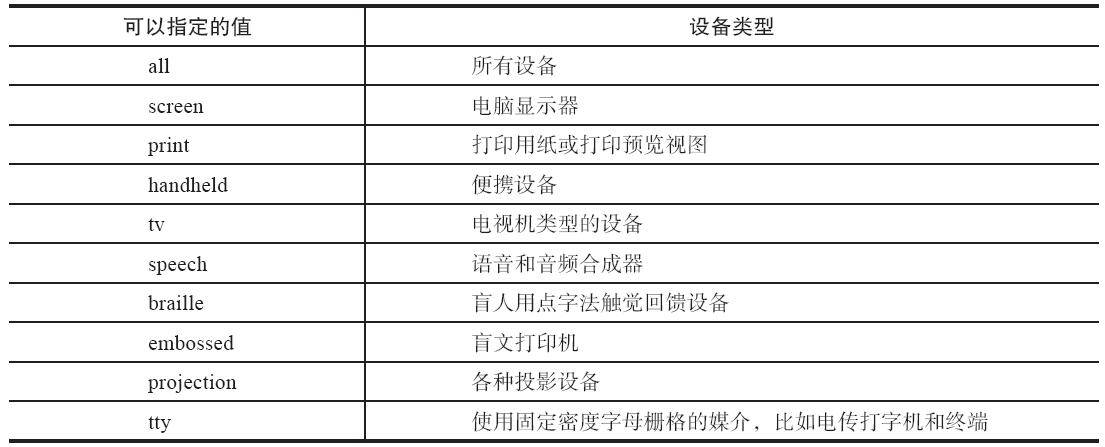
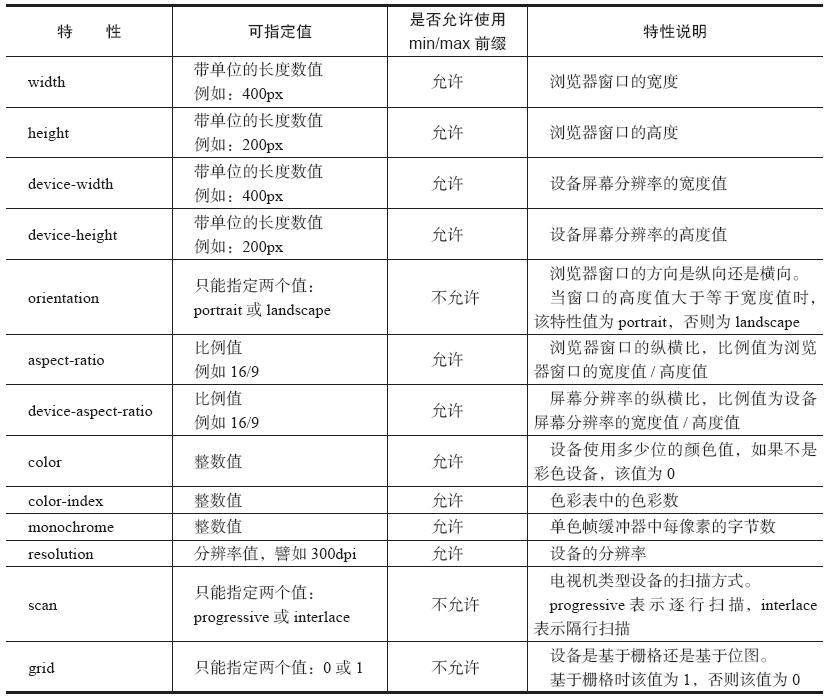
@media 设备类型 and (设备特性){ 样式代码 }
设备类型
设备特性
关键字
- and
- not :对后面的表达式执行取反操作
- only :让不支持媒体查询表达式但是能读取媒体类型的设备的浏览器将表达式中样式隐藏起来,如:@media only screen and color{样式代码}
外部样式表引用
@import url(color.css) screen and (min-width: 1000px);
<link rel=”stylesheet” type=”text/css” media=”screen and (min-widht: 1000px)” href=”style.css” />
特性查询表达式: @supports(CSS特性,如:display:grid){代码样式}
10. CSS3其他样式和属性
- 颜色:
- RGB和RGBA颜色 :红色值(R)、绿色值(G)、蓝色值(B)、alpha通道(A)
- rgb(255, 0, 0) rgba(255, 0, 0, 0.5)
- HSL和HSLA颜色 :色调(H)、饱和度(S)、亮度(L)、alpha通道(A)
- hsl(120, 100%, 50%) hsla(120, 100%, 50%, 0.5)
- opacity 设置透明度,如:opacity: 0.5;
- 颜色值 transparent :完全透明
- 区别 :
- alpha通道:可以针对元素单一属性指定透明度
- opacity:只能指定整个元素透明度
- 设置属性值为transparent,则完全透明,相当于值为0的alpha通道
- 轮廓 outline :
- outline-color
- outline-style
- outline-width
- outline: outline-color outline-style outline-width
- outline-offset :偏离距离
- resize 属性:允许用户通过拖动来修改元素尺寸
- none/both/horizontal/vertical/inherit
- inital 属性值:取消元素的样式指定
- pointer-event 属性:用于控制鼠标事件
- 滤镜特效: filter 属性
- grayscale :灰度滤镜
- specia :添加一层棕褐色色调,以实现老照片
- saturate :饱和度滤镜
- hue-rotate
- invert :颜色翻转滤镜
- opacity :透明度滤镜
- contrast :对比度滤镜
- blur :模糊滤镜
- drop-shadow :阴影滤镜
- CSS变量 :
- 定义:
- 以两个短划线开始
- 大小写敏感
- 使用:
- 通过var函数使用: var(custom-var-name<自定义变量名)>, declaration-value<替代值>]?)
- 遵循标准继承规则
- 使用Shadow DOM编写Web组件时, CSS变量可以跨越shadow边界
- var函数不能用于样式属性名 ,如:var(–side): 20px;
- 不能将变量值作为样式属性值的一部分, 可以用calc函数来计算CSS样式属性值 ,如:margin-top: calc(var(–gap) * 1px);
- 运行时获取CSS变量值: getComputedStyle(document.documentElement).getPropertyValue(变量名)
- 运行时设置CSS变量值: document.documentElement.style.setProperty(变量名, 值)
十三、实例
- html文件:
1 |
|
- mainstyle.css 文件
1 | body{ |
- script.js 文件:
1 | const dbName='MyData';//数据库名 |
- goods.json 文件:
1 | [ |
使用VSCode的Liver Server插件(避免浏览器因
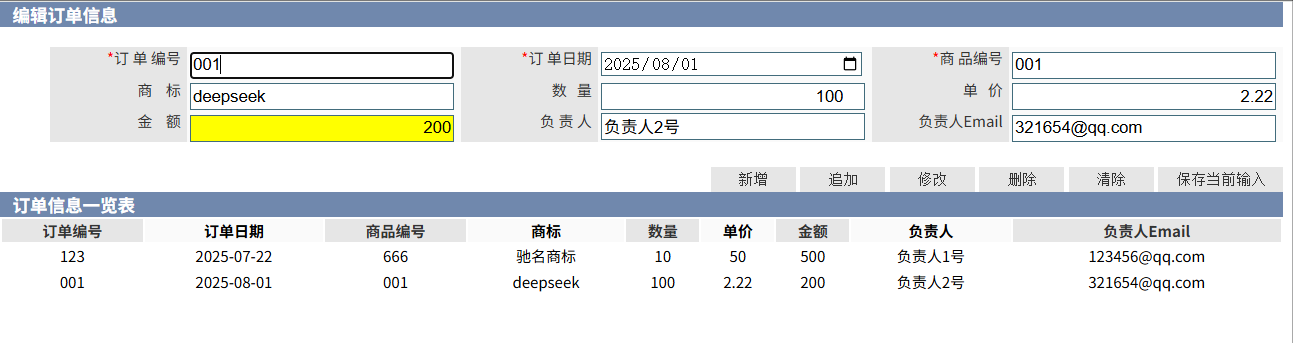
file://协议限制导致的跨域问题)查看,效果图如下: