根据学习的爬虫视频 实战项目,进行的扩展实战
扩展实现功能 :
根据片子id、播放源、下载集数,爬取在线播放网站的m3u8视频,并转化为mp4文件;
下载m3u8对应ts文件采用协程操作;
对于不同的集数采用线程操作
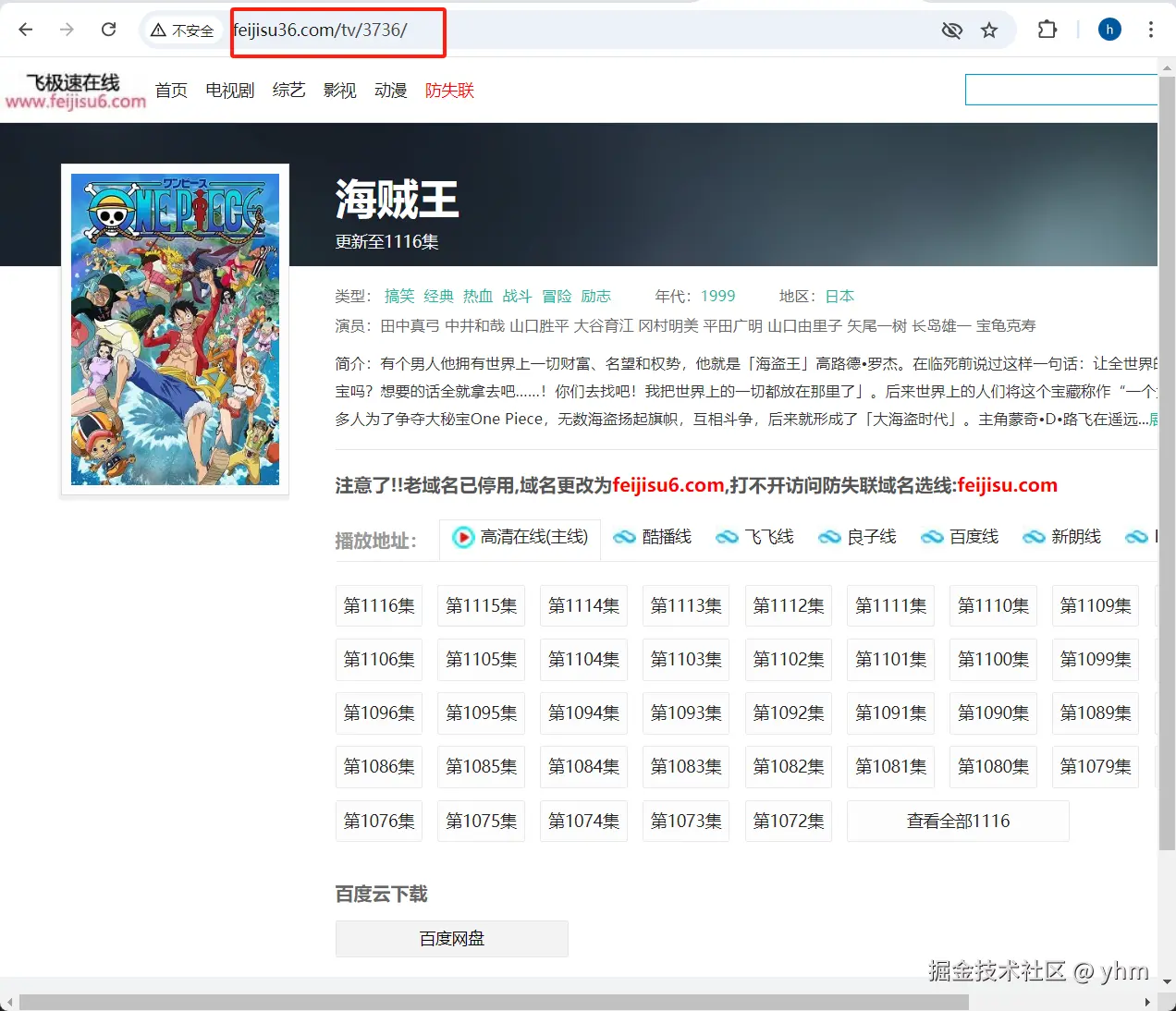
1. 思路分析 打开随便一部片子详情页,如下图,发现路径由 域名+/tv/+片子id组成
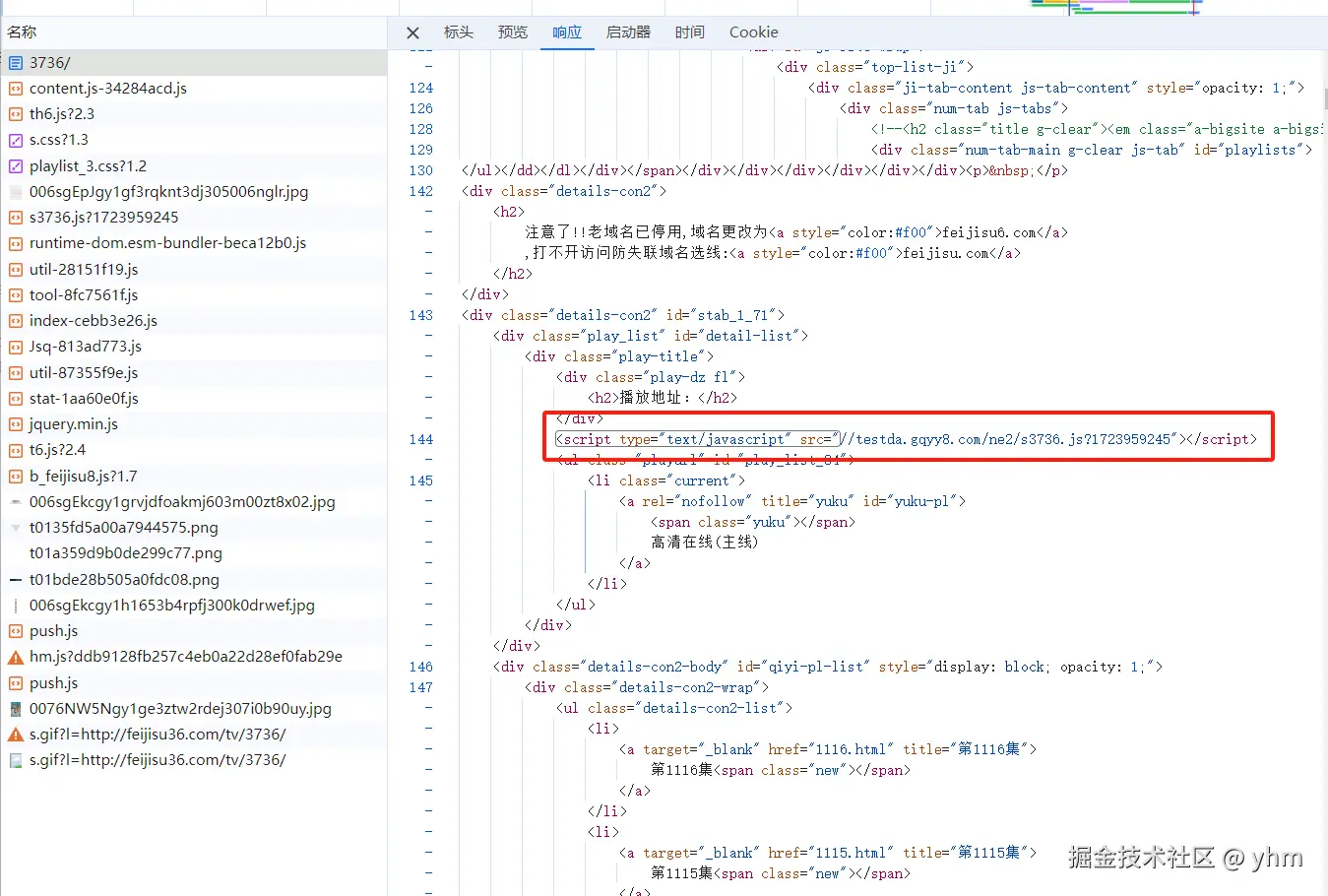
f12查看请求信息发现它返回一个html文件,其中引入了一个js文件
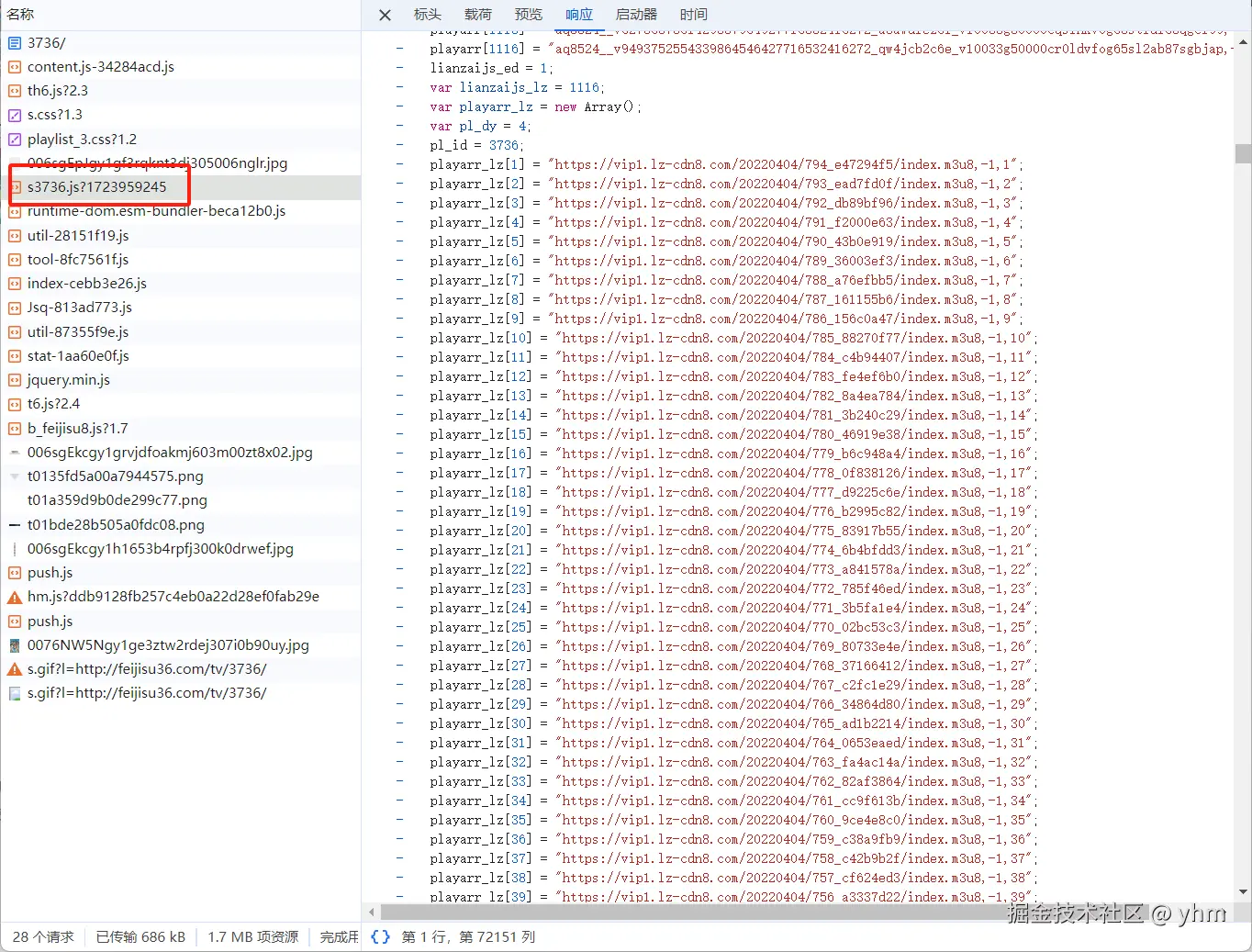
继续查看请求的js文件内容,发现是一个存放各种播放源、集数对应的m3u8链接列表文件
那么现在,我们就知道通过片子id、播放源、集数获取对应的m3u8文件的逻辑了 :先通过 域名+/tv/+片子id 获取详情页的html文件,然后找到引入的js文件路径,请求js文件,通过查找播放源、集数,就能匹配到对应的m3u8文件请求路径啦
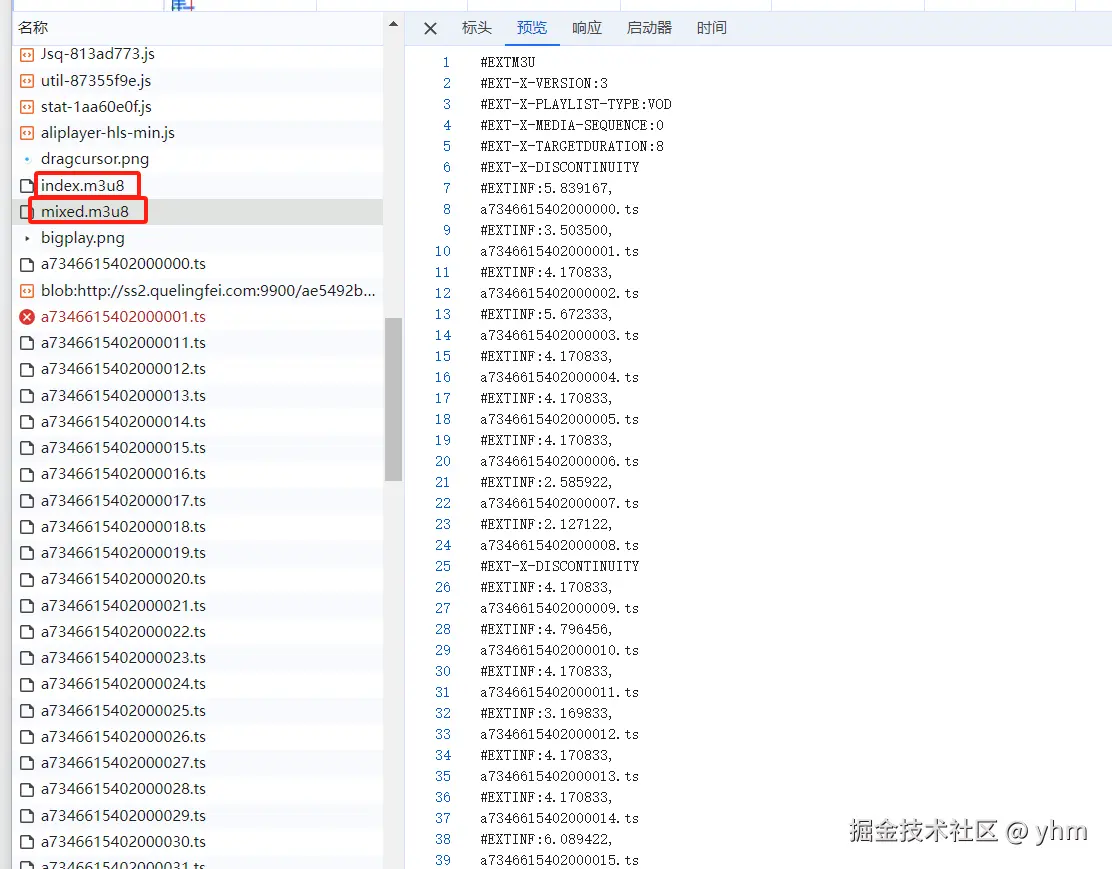
这样就完啦?以网站中良子线为例,我们请求看看上面对应的m3u8文件路径,如图,发现根本没有想象中的那些ts文件路径,这是因为真正的m3u8文件路径,其实是包含在这个文件中,即图片中圈住的内容
所以对于有些播放源,我们得进行二次处理获取真正的m3u8文件源
获取到真正的m3u8文件后,我们要做的就是拼接ts请求路径,发起请求把ts文件都请求下来即可;但是下载下来的ts文件都能直接播放?不不不,有些播放源,偷偷给你做了点小处理
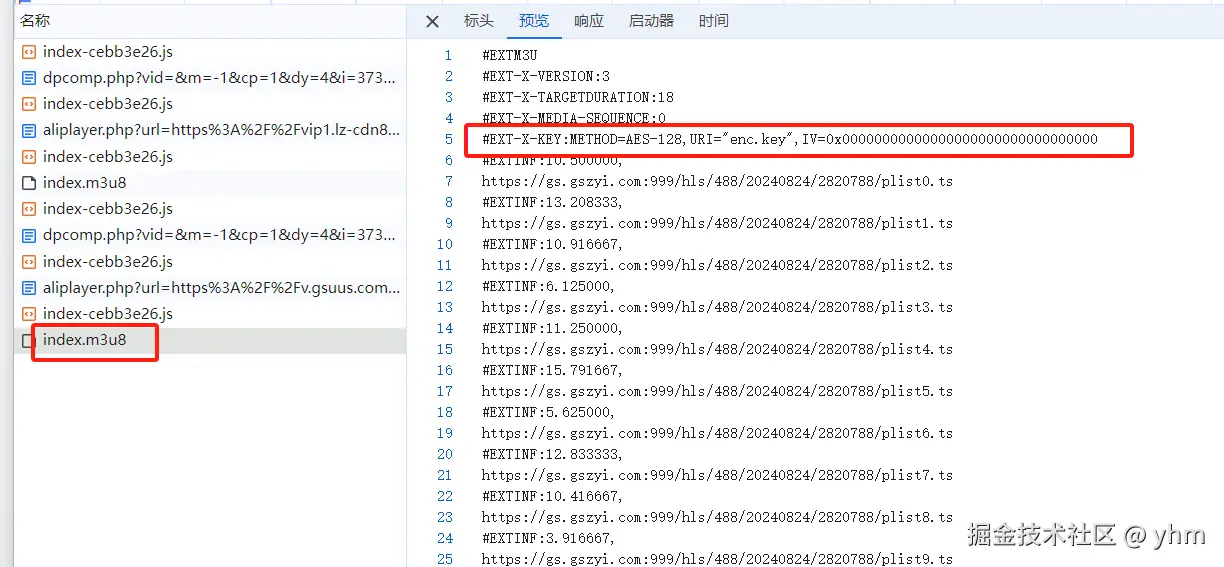
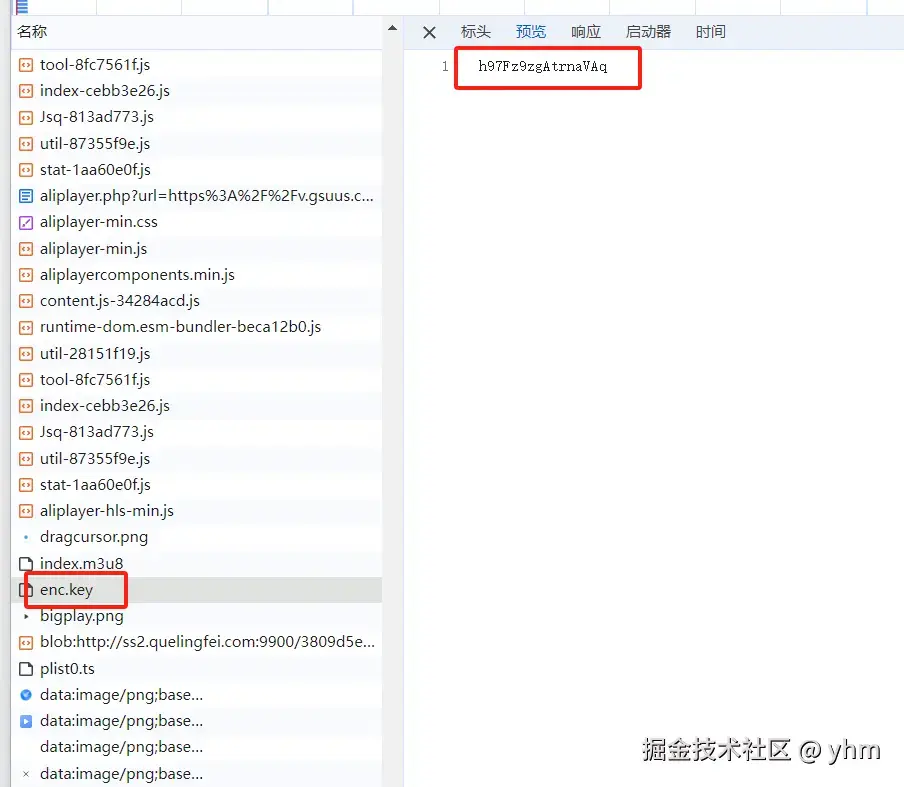
如上,有些播放源对ts文件是做了加密 的,想要获得能直接播放的ts文件,还得先进行解密操作;一般都是AES加密,获取到解密需要的key和iv值即可,其中key值,是需要根据URI拼接请求路径 获取到真正的key值的,如图
这下,我们终于能获得一堆能直接播放的ts文件啦,但是实际上都是很短的片段,想要看完整内容,还得把ts文件都合并成一个完整的,可以使用FFmpeg来进行合并操作,甚至是后续将ts文件转为mp4格式文件
FFmpeg 是一个开源的多媒体框架,能够记录、转换和流式传输音频和视频。它支持几乎所有的音频和视频格式,可以用于各种多媒体处理任务,如格式转换、视频编辑、音频提取、压缩等。
2. 编码环节 2.1 获取m3u8文件链接列表 拥有片子id我们可以拼接出详情页请求路径,获取html文件,再通过正则匹配得到存有m3u8链接列表的js文件,最后再根据播放源,匹配出所有的m3u8请求链接
1 2 3 4 5 6 7 8 9 10 11 12 13 14 15 16 17 18 19 def get_data (tv_id, play_type ): url = f'http://feijisu36.com/tv/{tv_id} /' response = requests.get(url) url = re.findall(r'<script type="text/javascript" src="(?P<url>.*?)"></script>' , response.text)[1 ] if not url.startswith('http' ): url = 'http:' + url resp = requests.get(url) temp = re.finditer('playarr_' + play_type + r'[.*?]="(?P<url>.*?)";' , resp.text) play_list = [] for it in temp: play_list.append(it.group('url' ).split(',' )[0 ]) return play_list
2.2 获取m3u8文件内容 get_m3u8 :获取m3u8文件内容,并保存,协程调用后续获取ts文件的操作deal_m3u8_content :就是用来处理上面分析的需要二次请求文件才能得到真正的m3u8文件的问题deal_ad :对于特定的播放源,m3u8文件中有一些广告的ts内容,在这里进行一下处理
1
2
3
4
5
6
7
8
9
10
11
12
13
14
15
16
17
18
19
20
21
22
23
24
25
26
27
28
29
30
31
32
33
34
35
36
37
38
39
40
41
42
43
44
45
46
47
48
49
50
51
52
53
54
def deal_m3u8_content (res, m3u8_url ): if video_play_type in ['lz' , 'kb' , 'ff' , 'uk' , 'wj' , 'fs' ]: uri = '' for line in res.text.splitlines(): if not line.startswith('#' ): uri = line.strip() if video_play_type in ['uk' , 'fs' ]: m3u8_url = '/' .join(m3u8_url.split('/' )[:3 ]) + uri else : m3u8_url = m3u8_url.replace(m3u8_url.split('/' )[-1 ], uri) response = requests.get(m3u8_url) return { 'content' : response.content, 'url' : m3u8_url } else : return { 'content' : res.content, 'url' : m3u8_url } def deal_ad (file_name ): if video_play_type == 'uk' : lines = open (file_name, 'r' ).readlines() new_line = [] flag = False for line in lines: if (line.startswith('#EXT-X-KEY' )): flag = not flag if flag: new_line.append(line) with open (file_name, 'w' ) as f: f.writelines(new_line) def get_m3u8 (v_id, m3u8_url ): file_name = f'temp/{video_id} _{video_play_type} _{v_id} .m3u8' result = deal_m3u8_content(requests.get(m3u8_url), m3u8_url) content = result['content' ] with open (file_name, 'wb' ) as f: f.write(content) print (f'获取{file_name} 的m3u8文件完毕' ) deal_ad(file_name) if video_play_type in ['lz' , 'ff' , 'kb' ]: asyncio.run(get_ts(file_name, result['url' ], v_id)) else : asyncio.run(get_ts(file_name, m3u8_url,v_id)) os.remove(file_name)
2.3 获取ts文件 get_ts :在这里处理m3u8文件内容(如果有加密,还要处理获得解密对象),拼接获取文件中所有ts文件请求路径,并各自创建异步任务调用download_ts方法来下载ts文件download_ts :ts文件下载。如果ts文件被加密,还要调用解密对象处理ts文件deal_ts_url :根据不同的播放源,用不同的方式拼接ts请求路径
1
2
3
4
5
6
7
8
9
10
11
12
13
14
15
16
17
18
19
20
21
22
23
24
25
26
27
28
29
30
31
32
33
34
35
36
37
38
39
40
41
42
43
44
45
46
47
48
49
50
51
52
53
54
55
56
async def download_ts (ts_url, file_name, session, des_info, ts_info ): try : async with session.get(ts_url, timeout=60 ) as response: if not response.status == 200 : for it in ts_info: if it['name' ] == file_name: it['code' ] = response.status return content = await response.content.read() if des_info['is_aes' ] == 1 : content = des_info['cipher' ].decrypt(pad(content, AES.block_size)) async with aiofiles.open (file_name, 'wb' ) as f: await f.write(content) print (f'{file_name} 文件获取完毕' ) except TimeoutError: return await download_ts(ts_url, file_name, session, des_info, ts_info) except ServerDisconnectedError: print ('ServerDisconnectedError' ) def deal_ts_url (line, m_url ): ts_url = line.strip() if video_play_type in ['lz' , 'kb' , 'ff' , 'bd' ]: ts_url = m_url.replace(m_url.split('/' )[-1 ], ts_url) elif video_play_type in ['uk' , 'fs' ]: ts_url = '/' .join(m_url.split('/' )[:3 ]) + ts_url return ts_url async def get_ts (m3u8_name, m_url, v_id ): tasks = [] ts_info = [] async with aiohttp.ClientSession() as session: async with aiofiles.open (m3u8_name, mode='r' ) as f: des_info = {"is_aes" : 0 } content = await f.read() if '#EXT-X-KEY' in content: des_info['is_aes' ] = 1 des_info['cipher' ] = await get_cipher(m_url, session, content) for line in content.splitlines(): if not line.startswith('#' ): file_name = f'temp/{video_id} _{video_play_type} _{v_id} _{line.strip().split("/" )[-1 ]} ' ts_url = deal_ts_url(line, m_url) tasks.append(asyncio.create_task(download_ts(ts_url, file_name, session, des_info, ts_info))) ts_info.append({ 'name' : file_name, 'code' : 200 }) print (f'共{len (ts_info)} 条ts文件' ) await asyncio.wait(tasks) deal_ts_files(ts_info, v_id)
2.4 设置ts解密对象 get_cipher 就是在处理m3u8文件中内容时,会调用的一个设置解密对象的方法;如果是对ts文件有加密的播放源,在这个方法中会获取key和iv值生成一个解密对象用于后续操作
1 2 3 4 5 6 7 8 9 10 11 12 13 14 15 16 17 async def get_cipher (url, session, content ): uri = re.search(r'URI="(?P<uri>.*?)"' , content).group('uri' ) iv = b'0000000000000000' if video_play_type in ['sn' , 'hn' ]: iv = re.search(r'IV=(?P<iv>.*)' , content).group('iv' ) iv = bytes .fromhex(iv[len (iv) % 16 :]) res_url = '' if video_play_type in ['uk' , 'fs' ]: res_url = '/' .join(url.split('/' )[:3 ]) + uri else : res_url = url.replace(url.split('/' )[-1 ], uri) async with session.get(res_url) as response: key = await response.content.read() cipher = AES.new(key, AES.MODE_CBC, iv) return cipher
2.5 合并ts文件,转成mp4格式 deal_ts_files :在ts片段文件都获取完之后调用的合并、转格式的方法(处理完成后会将原先的ts片段文件等都删除 )
1 2 3 4 5 6 7 8 9 10 11 12 13 14 15 16 17 18 19 20 21 22 23 24 25 26 def deal_ts_files (ts_files, v_id ): temp_file = f'temp/{video_id} _{video_play_type} _{v_id} _temp.txt' output_ts = f"temp/{video_id} _{video_play_type} _{v_id} _merged.ts" output_mp4 = f"temp/{video_id} _{video_play_type} _{v_id} _正片.mp4" for key, value in video_dict.items(): if value == video_id: output_mp4 = f"temp/{key} _{video_play_type} _{v_id} _正片.mp4" with open (temp_file, "w" ) as f: for ts_file in ts_files: if ts_file['code' ] == 200 : name = ts_file['name' ].split('/' )[-1 ] f.write(f"file '{name} '\n" ) subprocess.run(["ffmpeg" , "-f" , "concat" , "-safe" , "0" , "-i" , temp_file, "-c" , "copy" , output_ts]) subprocess.run(["ffmpeg" , "-i" , output_ts, "-c" , "copy" , output_mp4]) os.remove(output_ts) os.remove(temp_file) for ts_file in ts_files: if ts_file['code' ] == 200 : os.remove(ts_file['name' ]) print (f'{output_mp4} 合并完成' )
2.6 主函数 通过在代码中自行设定片子id,播放源,集数范围,可以下载不同的视频;片子的每一集,都是以线程的方式来进行加载处理
1
2
3
4
5
6
7
8
9
10
11
12
13
14
15
16
17
18
19
20
21
22
23
24
25
26
27
video_id = '3736' video_play_type = 'sn' video_range = [1 , 5 ] video_dict = { '海贼王' : '3736' , } if __name__ == '__main__' : url_list = get_data(video_id, video_play_type) m3u8_url_list = url_list[video_range[0 ]-1 :video_range[1 ]] with ThreadPoolExecutor(3 ) as executor: for index in range (len (m3u8_url_list)): executor.submit(get_m3u8, video_range[0 ]+index, m3u8_url_list[index])
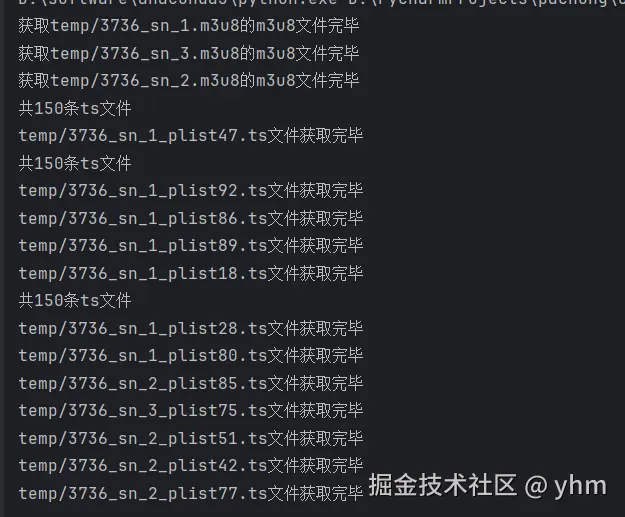
3. 运行效果 程序运行效果:
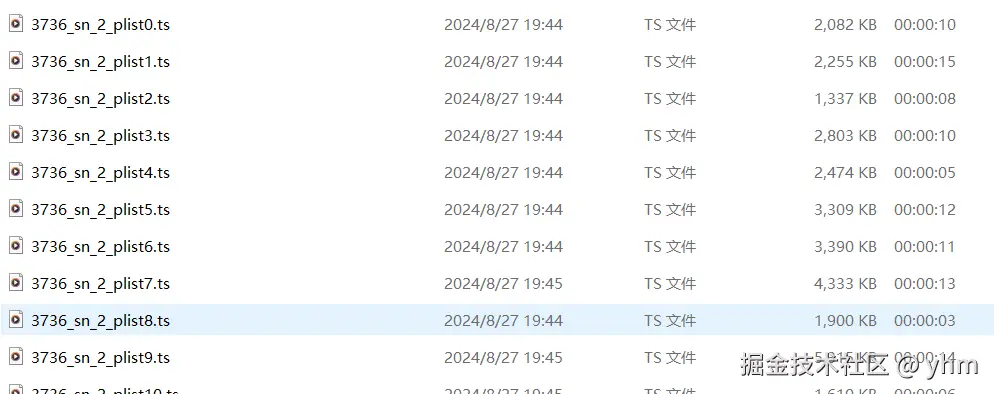
运行时下载的ts片段文件如图:
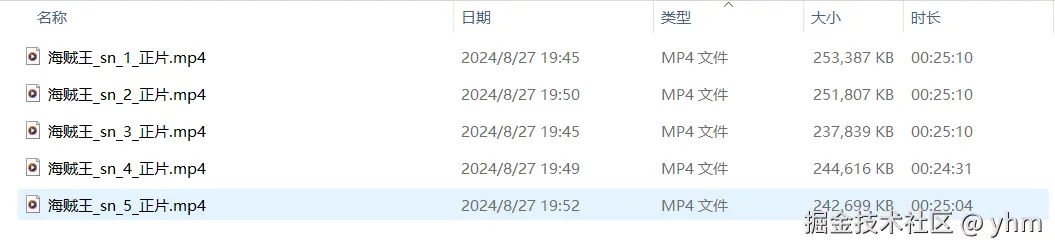
下载完成执行完合并和转格式操作后:
正常播放:
如果文章中有哪里没有讲明白,或者讲解有误的地方,欢迎在评论区批评指正。